 Gemini 4 Link
 Nano Banana 2.1
Nano Banana 2.1 is the newest image model this workspace serves. Two things decide what you can actually do here: the live Star Task catalog, which publishes the open modes, parameters and quote, and Google's own model documentation, which defines what the model is built for and where it still fails. This page keeps the two separate.
Results
Generated content will appear here
Examples
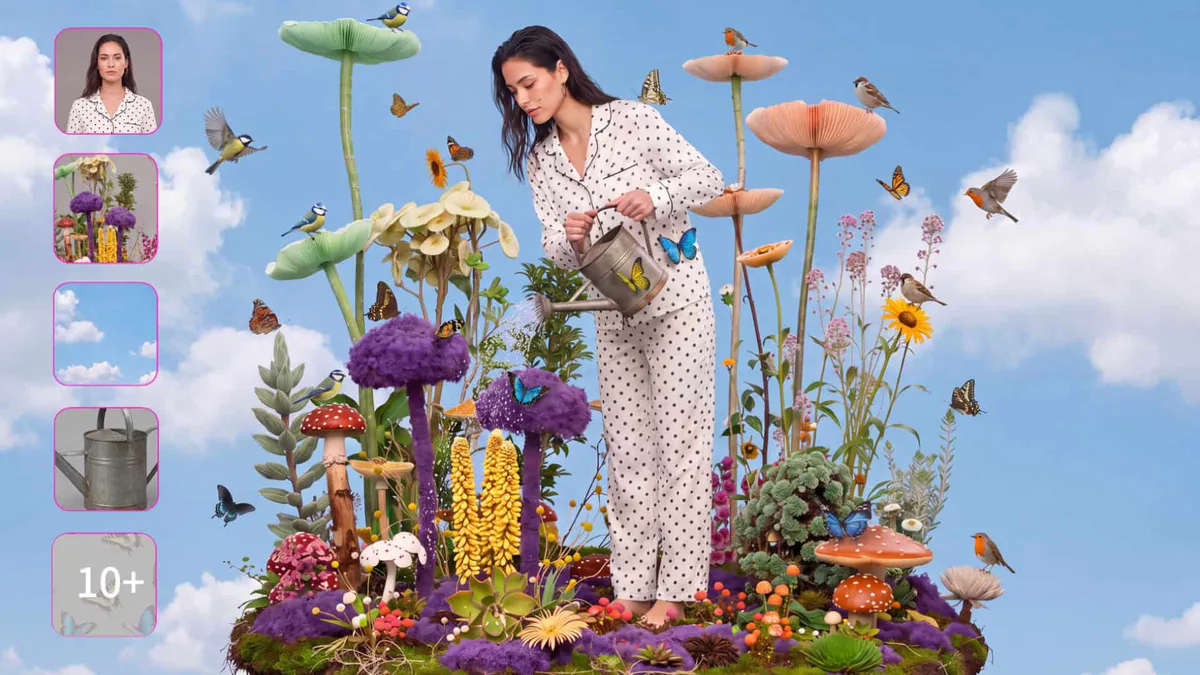
Multi-reference compositing, from OpenArt's Nano Banana 2.1 showcase: a person photo, garden elements, sky, and a watering can merged into one coherent scene, with every source reference visible at the left.
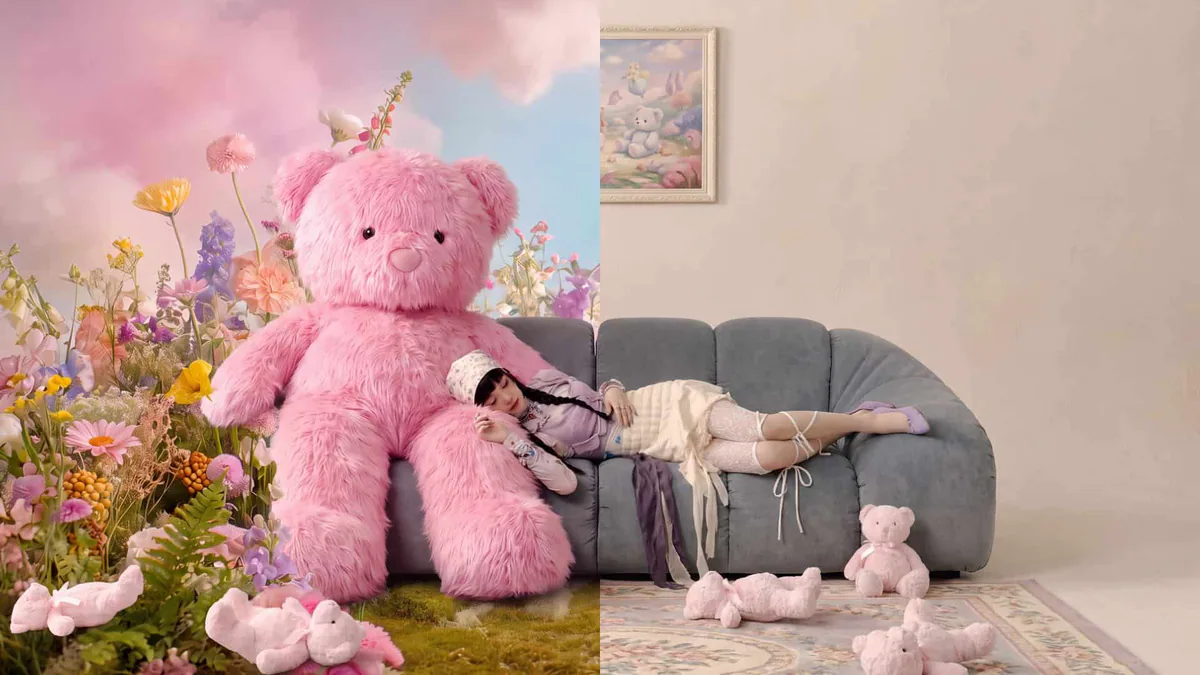
Conversational editing, from OpenArt's Nano Banana 2.1 showcase: the same subject carried from a staged product-style shot into a lifestyle scene through text instructions alone.
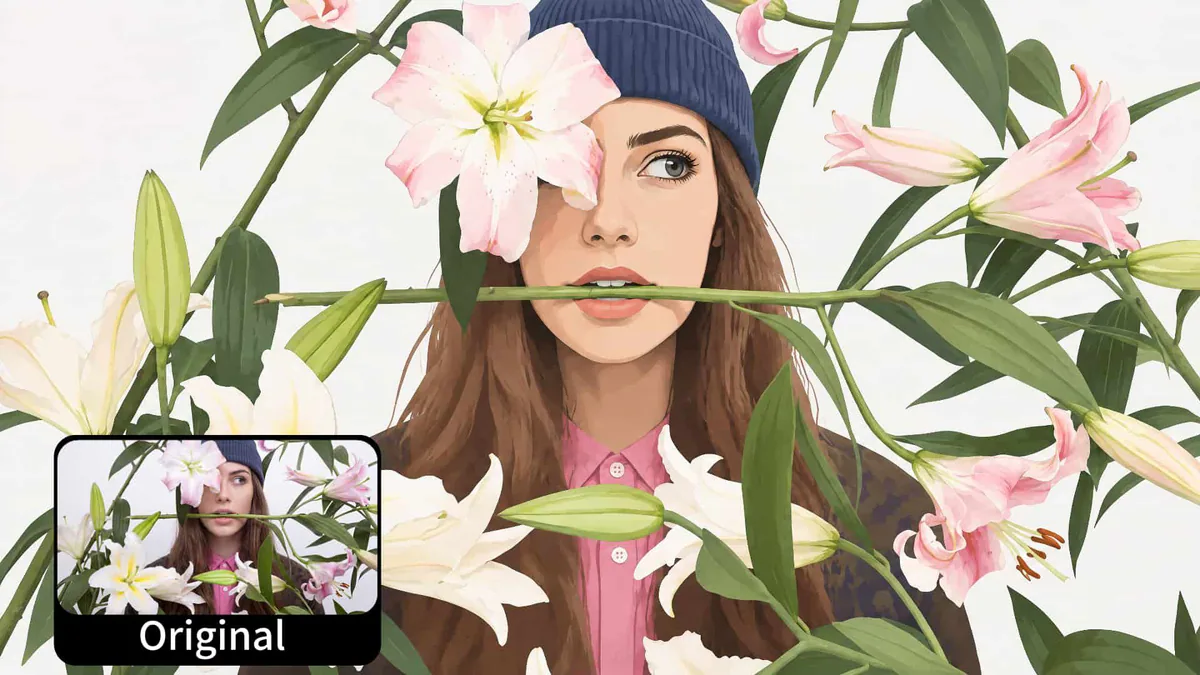
Style transfer, from OpenArt's Nano Banana 2.1 showcase: a photo of the same pose redrawn as a flat editorial illustration; the small inset marks the original frame.
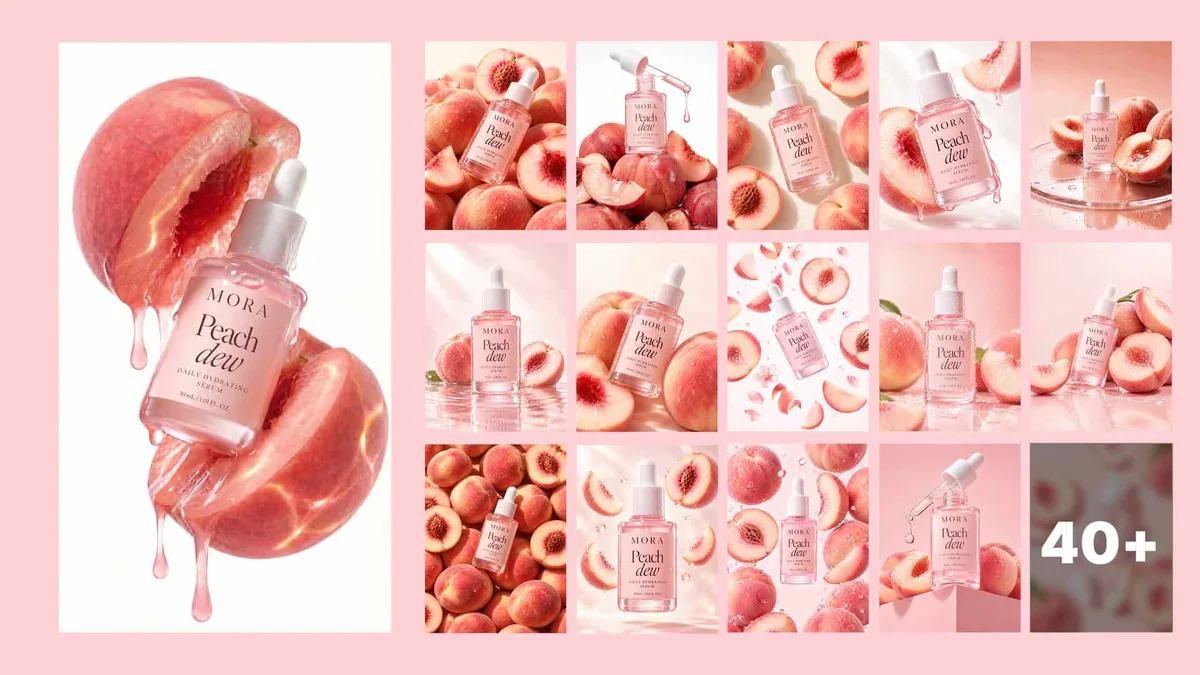
Batch consistency, from OpenArt's Nano Banana 2.1 showcase: one serum bottle re-shot across 40+ catalog-style variations — same label, same light, different staging.
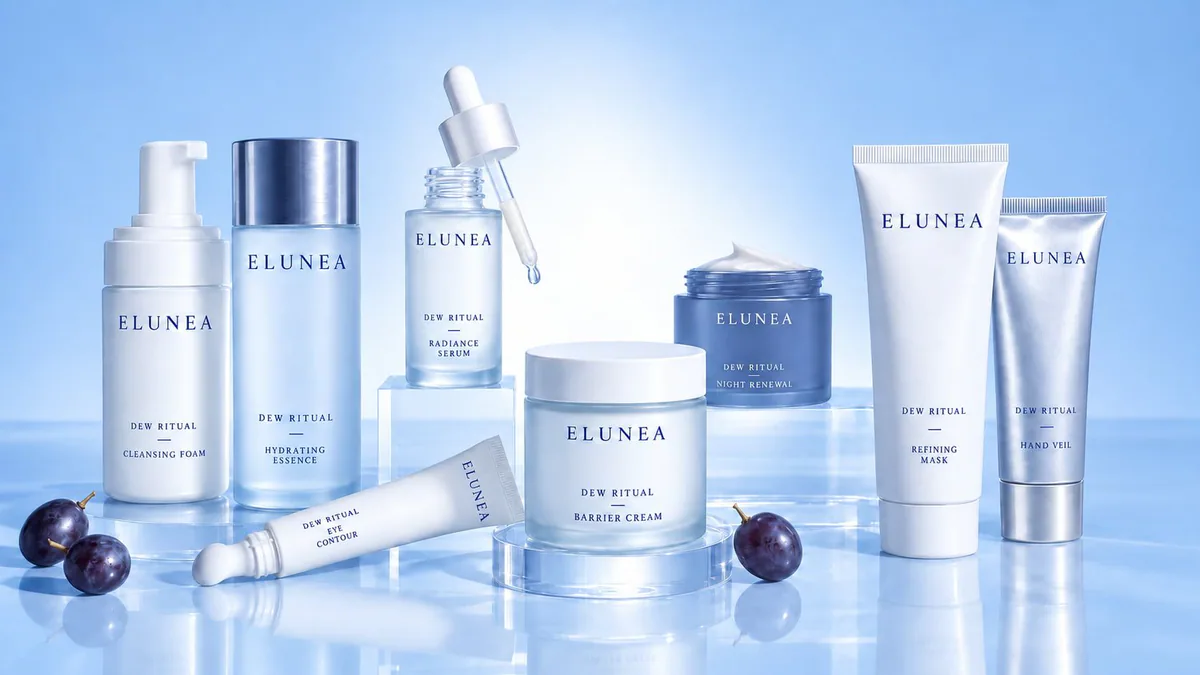
Full catalog generation, from OpenArt's Nano Banana 2.1 showcase: a coordinated seven-piece product line with matching typography, materials and set design from a single brief.
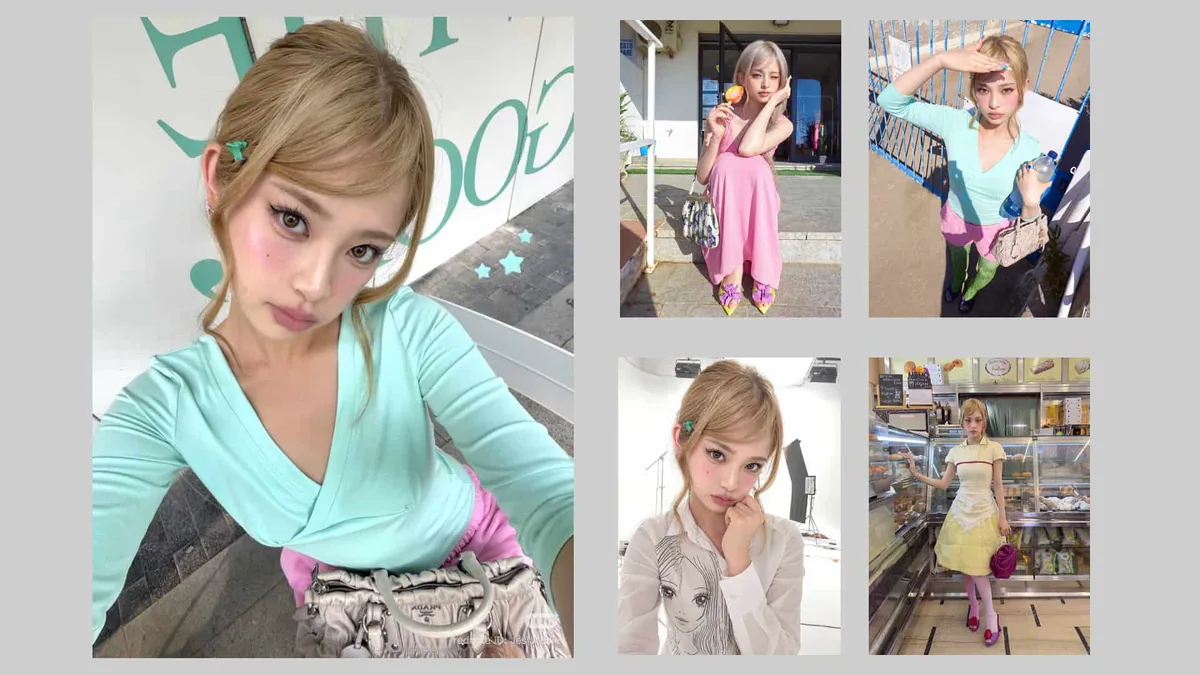
Daily social content, from OpenArt's Nano Banana 2.1 showcase: the same character keeps her face and styling across a week of posts in different outfits and locations.
How to read these cases
The six images above come from OpenArt's Nano Banana 2.1 showcase. They are platform demonstration artwork, not output produced on this site — every card says so in the line beneath the image. Read them as evidence of what each task type looks like, not as a promise of what your own run returns.
- What they cover: a multi-reference composite, conversational editing, style transfer, batch product consistency, a coordinated catalog, and a week of social posts with one character.
- Each card names its source and its rights under the image; nothing here is presented as this site’s own generation.
- The three prompts below are untested starting points, not recorded results — run them in the workspace and judge the output against the checklist further down.
A poster for a night market, headline text NIGHT MARKET in bold condensed type, warm lantern light, crowd silhouettes, 3:2 frame.
Using the attached product photo, change only the background to a plain warm grey studio sweep. Keep the product, lighting and framing identical.
The same person from the reference, now seated at a desk by a window, soft daylight, same clothing and hair, portrait framing.
If you have a reference image and want the words for it rather than a new render, the image-to-prompt tool reverses a photo into a prompt you can then paste back into this workspace.
What Nano Banana 2.1 is
Google published Nano Banana 2.1 as a generally available image model on October 6, 2026 under the model ID gemini-nano-banana-2.1, and describes it as optimized for multimodal image generation and editing with a balance of price and performance. The model card states it is based on Gemini 3.6 Flash. It succeeds Nano Banana 2 in Google's own image line, which is why it is now the first image model listed in this site's navigation.
Google's model card lists the jobs it is built for: creating and editing images with professional levels of precision and control across multiple quick iterations, generating clear text for posters and intricate diagrams, applying long-context real-world knowledge, and rendering localized text across several languages.
Treat those as the model's design targets. The catalog remains the authority on which of them this workspace exposes today.
What the live catalog publishes
- nano-banana-2.1 Star Task product ID listed as available, callable and priced for this site
- 2 open modes text-to-image and image-to-image
- 1K, 2K, 4K published resolutions catalog default 1K
- 14 published aspect ratios from 1:1 through 21:9; catalog default 1:1
- 3 / 4 / 6 reference points per result at 1K / 2K / 4K server quote is the authority, not this table
Open modes in this workspace
The live catalog publishes exactly two modes for this product, and the workbench offers only what it returns.
If a mode disappears or greys out, that is the catalog reporting a change upstream, not a page error. Reload and check the account workspace before assuming a fault.
- Text-to-image: you write the brief, the model draws it. Task model nano-banana-2.1.
- Image-to-image: you supply the reference you are allowed to process plus an instruction, and the model returns a new image. Task model nano-banana-2.1-i2i.
- Both modes accept the same four inputs published in the form schema: prompt (required), image_urls (optional, URL or base64), aspect_ratio and resolution.
- Google documents far more around this model — image generation from video input, multi-turn editing, virtual try-on, Google Search and Image search grounding, C2PA Content Credentials. None of those are separate controls here; only the two modes above are exposed.
How to use it, step by step
Four steps cover both modes. The order matters because the quote is requested before anything is charged.
- Open this page's workspace and confirm Nano Banana 2.1 is the selected model. It is the default on this page.
- Choose the mode that matches what you already have: text-to-image for a new picture, image-to-image when the subject, layout or product is fixed and you are changing something about it.
- Set aspect ratio and resolution. Start at 1K to settle direction cheaply; move to 2K or 4K once the composition is right, because Google's own guidance is that small text suffers at 1K.
- Read the server quote for those exact settings, submit, and wait for the polled result. A failed task reports a reason; the account workspace keeps the history.
Parameters and input limits
The catalog publishes the four fields this workspace can send. Google's model documentation publishes the wider envelope of the model itself. Both are reproduced below; where they differ, the catalog wins for anything you submit here.
| Item | Published by Star Task for this site | Published by Google for the model |
|---|---|---|
| Open modes | text-to-image, image-to-image | image generation, image generation from video input, edit images, multi-turn image editing, interleaved images and text |
| Required inputs | prompt (required), image_urls (optional, URL or base64) | text and images; audio not supported; video input only |
| Aspect ratio | 14 values, default 1:1 — 1:1, 1:4, 1:8, 2:3, 3:2, 3:4, 4:1, 4:3, 4:5, 5:4, 8:1, 9:16, 16:9, 21:9 | 15 values, adding 9:21 |
| Resolution | 1K, 2K, 4K; default 1K | 1K, 2K, 4K; 1,120 output tokens at 1K, 1,680 at 2K, 3,780 at 4K |
| Reference images | no ceiling published; this site caps the picker at 5 until the catalog states one | up to 14 images per prompt; 7 MB inline or console upload, 30 MB from Cloud Storage; png, jpeg, webp, heic, heif |
| Context and output | not published in the catalog | 131,072-token context window, 32,768 maximum output tokens, 500 MB input size limit |
| Sampling controls | none exposed | seed, topK, logprobs, temperature and topP are not supported and return an API error |
| Structured output | not exposed | not supported; thinking and system instructions are supported |
Two consequences follow from that table. You cannot pin a result with a seed, so an identical prompt can still vary between runs; save the image you like rather than assuming you can regenerate it. And because structured output is not supported, do not build a pipeline that expects JSON back from this model.
Writing prompts that hold up
The model card's known-limitation list is the best prompt guide available for this model: it names partial instruction following, character drift, spatial confusion and weak small-text rendering. Write against those four.
[subject] [action], in [setting]. Composition: [framing, angle, distance]. Style: [medium, lighting, mood]. Keep [element] on the [left/right] of the frame.
Using the attached image, change only [specific element] to [new element]. Keep everything else identical — same framing, same lighting, same style.
A [format] with the headline text [exact string] set in [type style]. Keep the text legible at final size; no other text in the frame.
Three habits do most of the work. Name positions explicitly instead of relying on the model to infer them. State what you want rather than what you want to avoid. And keep one instruction per edit: the card reports partial instruction following in masked and doodle-based editing, so a long list of changes in a single turn is where results slip.
When text matters, raise the resolution before you re-prompt. Google's own limitation list names small text as often blurry at 1K.
Where it fits
These are the tasks the published modes and the model's stated design targets actually support.
- Poster and social visuals where the layout carries a short headline.
- Product and scene imagery where one object has to stay recognizable across a set.
- Reference-image editing: swap a material, a background or a single element while holding the composition.
- Infographics and diagrams, which the model card names explicitly and which benefit from search grounding.
- Localized variants of the same visual, because multi-language text rendering is a listed strength.
Where it does not fit
Every line below is published by Google or by the catalog, not inferred from a benchmark.
- Long paragraphs or dense page-length text: the model card names poor rendering for both.
- Anything needing a reproducible result: sampling controls are unsupported, so there is no seed to pin.
- Machine-readable output: structured output, function calling and code execution are all listed as not supported.
- Audio work of any kind: audio is not supported.
- Video input pipelines on this site: Google supports video input for the model, but the catalog exposes text and images only.
- Work that must be factually exact without review: the card lists hallucinations and limited factuality among the known limitations.
Common failures and what to do
The failure modes below come from Google's published limitation list plus the parts of the task flow this site controls.
| What you see | Likely cause | What to do |
|---|---|---|
| Small text comes back blurry or misspelled | Google names poor small-text rendering at 1K and trouble with long paragraphs | Re-run at 2K or 4K with fewer words in the frame, then check the image at final display size |
| A face or product drifts between the reference and the result | Character consistency is not always perfect between input and output | Reduce the change to one element per turn and keep the same reference across the series |
| Only part of a long instruction was applied | Partial instruction following and ink persistence in masked or doodle-based editing | Split the brief into separate turns, one change each |
| The pose or layout of the source image survives the edit | Rare persistent subject pose, where structural alignment is retained | Ask for the new composition explicitly, or start from text instead of the reference |
| Left and right, or above and below, are swapped | Occasional confusion around spatial localisation | Name the position in the prompt rather than implying it |
| The task times out or sits in processing | The card lists occasional slowness and timeout issues | Wait for the poll to finish, then check the account workspace; do not resubmit blindly |
| Submission is refused or the quote looks wrong | The catalog changed, the session expired, or credits are short | Reload the page to refresh the catalog, sign in again, then compare the quote with the credit balance |
Output checklist before you publish
Run this over the returned image. It is short because every item corresponds to a failure the model card or the catalog already documents.
One item is worth adding from user discussion rather than documentation: individual community posts raise doubts about prompt adherence, person similarity and whether this model really displaces the Pro tier. Those are unverified individual reports, not results. That is exactly why the checklist above asks you to verify text, likeness and claims yourself instead of trusting the first render.
- Zoom to the final display size and read every piece of text; re-run at a higher resolution if anything is soft or misspelled.
- Compare faces, products and logos against your reference and confirm nothing drifted.
- Check left, right, above and below against what the brief asked for.
- Verify any factual claim the image makes — a date, a place, a label — against a source you trust.
- Confirm the aspect ratio and resolution match where the image will actually be used.
- Keep the file's provenance with it. Google lists C2PA Content Credentials as supported, so treat the credential as part of the deliverable.
Choosing between Nano Banana 2.1, Nano Banana 2 and Lite
The comparison that matters on this site is the one the catalog publishes, because that is what you are actually charged for.
| Product | Resolutions | Aspect ratios | Reference price | Pick it when |
|---|---|---|---|---|
| Nano Banana 2.1 | 1K, 2K, 4K | 14, default 1:1 | 3 / 4 / 6 points per result | Default choice: newest published model, full resolution range, both modes open |
| Nano Banana 2 | 1K, 2K, 4K | 14, default 1:1 | 3 / 4 / 6 points per result | You have an established workflow on it; the catalog prices it identically, so this is a habit call, not a cost call |
| Nano Banana 2 Lite | 1K only | 7, default 1:1 | 2 points per result | Volume drafting and A/B variants where 1K is the delivery size |
The honest summary: on this site, Nano Banana 2.1 and Nano Banana 2 publish identical modes, resolutions, ratios and reference prices, so there is no billing reason to prefer the older one. Lite is the only cheaper option, and it buys that with a 1K ceiling and seven ratios. Where quality differences are concerned, Google's published evaluation numbers are vendor-reported and we do not republish them as this site's findings.
Credits, quotes and where the charge is set
The reference points shown on this page come from the catalog and are an estimate, not an invoice. The server quote is computed from the settings you actually submit, and the account ledger records what a completed task cost. Nothing here is charged for browsing, quoting or reading.
Questions
Is Nano Banana 2.1 actually callable on this site?
Yes. The live catalog for this site lists the product as available, callable and priced, with text-to-image and image-to-image modes. If that ever changes, the workbench follows the catalog.
Which modes can I use?
Text-to-image and image-to-image. Google documents additional capabilities around the model — video input, multi-turn editing, virtual try-on, search grounding — but this workspace exposes the two modes the catalog publishes.
What resolutions and aspect ratios are offered?
The catalog publishes 1K, 2K and 4K with a default of 1K, and fourteen aspect ratios from 1:1 through 21:9 with a default of 1:1. Google's model documentation lists the same resolutions and adds a fifteenth ratio, 9:21, which this workspace does not offer.
How many reference images can I attach?
Star Task publishes no ceiling for this product, so this site keeps the picker at five until the catalog states otherwise. Google's own documentation allows up to 14 images per prompt at 7 MB inline or 30 MB from Cloud Storage, in png, jpeg, webp, heic or heif.
How much does one image cost?
The catalog's reference price is 3 points per result at 1K, 4 at 2K and 6 at 4K. The authoritative number is the server quote for your exact settings, and the final figure is what the account ledger records for the completed task.
Can I make results reproducible?
No. Google lists seed, topK, logprobs, temperature and topP as unsupported for this model, and setting them returns an API error. Save the image you want instead of expecting to regenerate it.
Why is my in-image text blurry?
Google's model card names poor text rendering in small text, often blurry at 1K, along with long paragraphs and page length as known limitations. Re-run at 2K or 4K and shorten the text in the frame.
Does it keep a person or product consistent?
Consistency is a listed strength but not a guarantee: the model card states character consistency is not always perfect between input and generated output. Change one thing per turn and keep the same reference across the series.
Is this better than Nano Banana Pro?
We do not publish that comparison. Google's evaluation figures are vendor-reported and we will not republish them as this site's results. On this site the practical difference is the catalog: 2.1 publishes the full resolution range at a lower reference price than the Pro tier.
Why are there no example images on this page?
No generation has been run and verified here yet. Publishing a vendor gallery image or a competitor's example as a local result would misrepresent it, so the gallery stays empty until a real task backs each card.
What happens when a task fails?
The task reports a reason and the account workspace keeps the history. Common recoverable cases are a resolution that is too low for the text you asked for, a reference image that is too large or in an unsupported format, or credits that ran short.
Is this part of Google's Gemini 4 family?
No. Nano Banana 2.1 is an image model based on Gemini 3.6 Flash, published October 6, 2026. Gemini 4 is Google's separate text-generation family, which this workspace does not call.
Explore next
Image to prompt: read a reusable prompt from any photo
Turn any image into a reusable prompt — subject, style, lighting and lens, in the order each AI model reads it. Honest limits and a rights checklist included.
Nano Banana 2
Nano Banana 2 is Gemini 3.1 Flash Image: 4K output, 14 reference images, in-image text and search grounding. Official specs, limits and prompt frameworks.
Nano Banana 2 Lite
Nano Banana 2 Lite is Gemini 3.1 Flash-Lite Image: about four seconds per 1K image at roughly $0.034. Where it wins, where it does not, and when to move up.